DERO Daemon (Node)

The DERO daemon (derod) is the core software that runs the DERO blockchain network. It validates transactions, maintains the blockchain, and connects peers in a decentralized P2P network.
Download: GitHub Releases (opens in a new tab)
What Does a Daemon Do?
| Function | What It Does | Source Code |
|---|---|---|
| Transaction Validation | Verify proofs, ring sigs, bulletproofs | blockchain/transaction_verify.go |
| Block Processing | Execute transactions, update balances | blockchain/transaction_execute.go:239 |
| P2P Networking | Sync with peers, propagate blocks/TXs | p2p/connection.go |
| Mining | Provide PoW templates, validate solutions | blockchain/mining.go |
| RPC API | Serve wallet requests, smart contract calls | rpc/rpc_dero.go |
Network Ports
Mainnet
| Service | Port | Purpose |
|---|---|---|
| P2P | 10101 | Node-to-node communication — randomized at startup; pin with --p2p-bind=0.0.0.0:10101 (details) |
| RPC | 10102 | Daemon RPC API |
| Wallet RPC | 10103 | Wallet communication |
Testnet
| Service | Port | Purpose |
|---|---|---|
| P2P | 40401 | Node-to-node communication (randomized; pin with --p2p-bind=0.0.0.0:40401) |
| RPC | 40402 | Daemon RPC API |
| Wallet RPC | 40403 | Wallet communication |
Source: config/config.go (RPC + GETWORK ports); p2p/controller.go:502 (P2P default 0.0.0.0:0 — random); README.md:133 (10101 convention).
Verify your binaries
Before running derod or dero-wallet-cli from a download, confirm the binary matches Captain's published GPG signature and the release sha512sum:
gpg --verify checksum.txt.asc
sha512sum dero_linux_amd64.tar.gzReading the derod prompt
When you start derod, the top of the terminal looks like this:
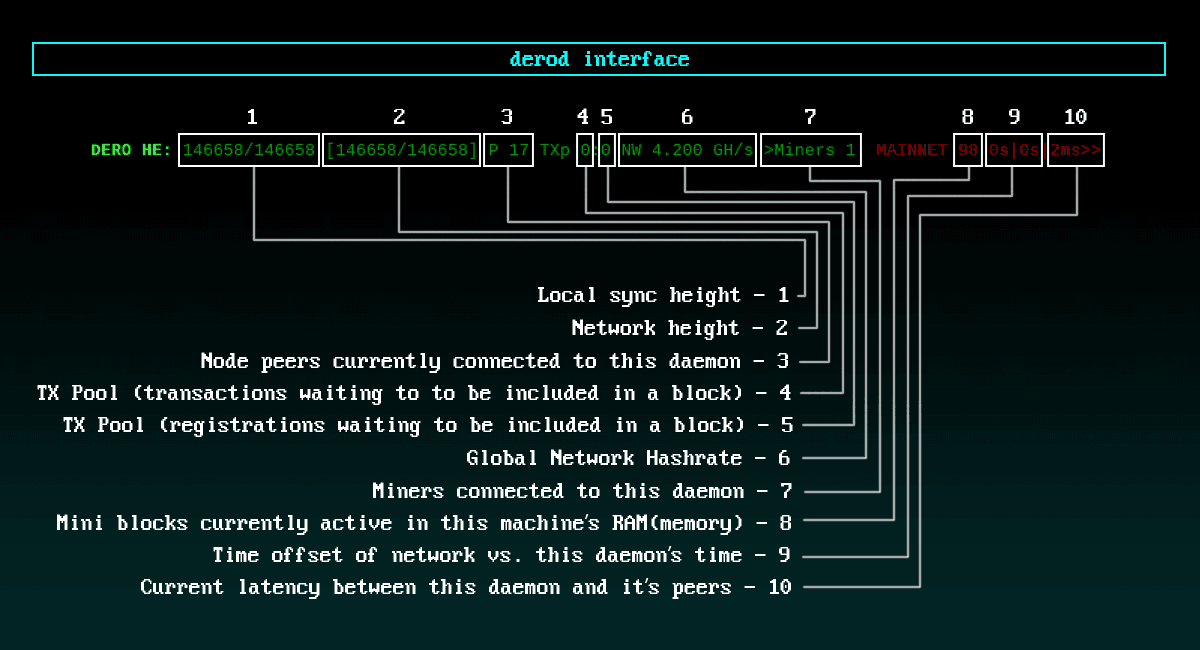
Details about DERO daemon prompt. Also run status/syncinfo/help cmd in daemon for details.
Every field on the prompt is a live signal. Once you can read it, you can diagnose almost any daemon problem at a glance.
| # | Field on prompt | Meaning |
|---|---|---|
| 1 | 146658/146658 | Local sync height — your node's chain tip |
| 2 | [146658/146658] | Network height — what your peers agree on |
| 3 | P 17 | Peers — daemons currently connected to you |
| 4 | TXp 0 | TX pool — transactions waiting to be included |
| 5 | 0 | Registration pool — wallet registrations waiting |
| 6 | NW 4.200 GH/s | Global network hashrate |
| 7 | >Miners 1 | Miners connected to your daemon |
| 8 | 98 | Miniblocks currently active in this machine's RAM |
| 9 | 0s|0s | Time offsets — NTP vs peer-derived |
| 10 | 2ms>> | Latency between this daemon and its peers |
Read the prompt left to right:
- When 1 and 2 match, you're synced.
- When 9 shows non-zero seconds, your clock is drifting — fix NTP (see Mining → Time sync — install chrony).
- When 10 climbs into the hundreds of ms, check your network.
Three commands give you more detail any time you need it:
status     # chain height, peers, version, top hash
syncinfo   # per-peer height and direction
help       # full command list
MB / MBR / IB counters
When you're mining (or operating a daemon other miners connect to), three additional counters appear under the prompt's Mining Stats:
| Code | Meaning | Healthy? |
|---|---|---|
MB | Miniblock submitted | yes |
MBR | Miniblock rejected (usually invalid PoW) | only if rare |
IB | Integrator block submitted | yes |
The status command's Block Minted line is (MB + IB) − MBR — so when MBR climbs, your minted count visibly drops. MBR is PoW-test rejection only (cmd/derod/rpc/websocket_getwork_server.go:137), so the root-causes to check, in order: (1) clock drift on the miner host (Mining → Time sync); (2) network instability dropping work mid-flight; (3) an unofficial miner binary submitting malformed work — switch back to the official dero-miner.
Running Your Own Node
Basic command:
./derod-linux-amd64

# With custom settings
./derod-linux-amd64 --rpc-bind=0.0.0.0:10102 --p2p-bind=0.0.0.0:10101
System Requirements:
- CPU: 2 to 4 cores minimum
- RAM: 4GB minimum
- Disk: 15GB+ SSD (grows over time)
- Network: Stable internet connection
Integrator Rewards
The 10% Daemon Bonus
How it works:
Every 10 miniblocks → 1 integrator block
  • 9 regular miniblocks (normal difficulty)
  • 1 integrator block (9× difficulty)

Integrator block reward → Your daemon address
Result: Daemon operators earn ~10% of blocks mined on their node
Why run your own daemon:
- ✅ Earn 10% integrator rewards (vs 1.6% fee to pool operators)
- ✅ Support network decentralization
- ✅ Full privacy (no third-party node)
- ✅ Contribute to blockchain security
Source: Miniblock system described in blockchain/blockchain.go
Sync Status
Understanding the numbers:
# Daemon display
Height: 6090778/6090778  ← Synced!
         ^local  ^network

Not synced: 5500000/6090778
Syncing:    6090000/6090778 (99.9%)
Synced:     6090778/6090778 ✓
Fast sync vs Full sync:
- Full sync: Downloads and validates entire blockchain (slow, complete)
- Fast sync: Downloads state snapshots (faster, still secure)
Pruned-node height — why your status looks short
If you started your node with --fastsync, status will print a line like:
Chain is pruned till 6087500…meaning blocks before that point exist only on full-history nodes. The chain still validates correctly — you just can't serve TX queries from before the prune point.
If you need full history (e.g. to serve TX queries from genesis), there is no "backfill" — --fastsync is a bootstrap-only flag (cmd/derod/main.go:73), and toggling it off post-bootstrap doesn't recover pruned blocks. Captain's recommended path for full history is to start over: stop derod, delete the mainnet/ folder, and run a full sync from zero (no --fastsync).
When your node gets stuck — the pop escalation
If your daemon stops advancing or believes a wrong tip, Captain's recommended recovery is to rewind blocks from the top and let the chain re-sync from your peers.
In practice the ladder operators converge on is:
| Step | Command | When |
|---|---|---|
| 1 | pop 20 (in derod) | Brief hiccup, recent fork |
| 2 | pop 50000 | After step 1 doesn't unstick within minutes |
| 3 | Stop derod → delete the mainnet/ folder → restart with --fastsync | Nuclear option |
Steps 1 and 2 are Captain's direct recommendation. Intermediate values (pop 1000, pop 10000) work the same way — pop N simply rewinds N blocks; pick whatever distance reflects how far back you suspect the wedge is.
Daemon as Mining Pool
Each daemon acts as its own mining pool:
| Role | Fee | How It Works |
|---|---|---|
| Daemon Operator | 1.6% | Runs node, provides infrastructure |
| Miners | 88.4% | Connect and mine, split proportionally |
| Integrator | 10% | Daemon's address for integrator blocks |
Total: 100% (nothing wasted)
Connect miners to your daemon:
# Miner connects to daemon
./dero-miner-linux-amd64 --daemon-rpc-address=127.0.0.1:10100 --wallet-address=dero1qy...
Daemon tracks shares and distributes rewards automatically
Source: Mining pool logic in blockchain/miniblocks.go
Key Features
Privacy-Preserving
- ✅ TLS-encrypted P2P connections
- ✅ Stores encrypted balances (ElGamal)
- ✅ Validates without revealing amounts
- ✅ No metadata leakage
Lightweight Storage
Blockchain storage:
  • Account: 66 bytes (encrypted balance)
  • Total accounts: Scales efficiently
  • Pruning: Can reduce disk usage

1 billion accounts = ~200GB (with overhead)
Source: README.md (lines 92-98)
Fast Validation
- Block time: ~18 seconds
- Transaction verification: under 25ms
- Instant balance queries: 66 bytes
Daemon Commands
Interactive mode:
$ ./derod

Commands available:
  status          # Show blockchain height, peers
  peer_list       # Connected peers
  diff            # Current difficulty
  print_bc        # Print blockchain info
  print_block     # Show specific block
  print_tx        # Show transaction details
  exit            # Stop daemon
Useful RPC calls:
# Get blockchain info
curl http://127.0.0.1:10102/json_rpc \
  -d '{"method":"DERO.GetInfo"}'

# Get block details
curl http://127.0.0.1:10102/json_rpc \
  -d '{"method":"DERO.GetBlock","params":{"height":100000}}'
Why Run a Daemon?
Benefits:
| Benefit | Description |
|---|---|
| Privacy | No third-party sees your queries |
| Integrator Rewards | Earn 10% of blocks mined on your node |
| Network Support | Contribute to decentralization |
| Self-Sovereignty | Complete control, no trust needed |
| Mining Pool | Support friends/family mining |
Trade-offs:
- Requires: Always-on machine, disk space, bandwidth
- Maintains: Full blockchain copy
- Syncs: Initially time-consuming
Related Pages
Get Started:
- Running a Node - Complete VPS setup guide
- DERO Mining - How to mine with your node
API & Integration:
- Daemon RPC API - Full API reference
- Network Ports & Setup - P2P network details
Understanding DERO:
- DERO Blockchain - How DERO works
- Smart Contracts - DVM integration